---
title: Bitovi Academy - Reactive Forms Data Binding
description: Learn how to create a Reactive Form with Angular. We will create a Reactive Form in the Restaurant component with city and state dropdown inputs.
---

- ![AI implementation](https://www.bitovi.com/hubfs/AIConsultingIcon.svg)
  
  [AI implementation](https://www.bitovi.com/services/ai-consulting?hsLang=en-us)
- ![Systems engineering](https://www.bitovi.com/hubfs/icon%20-%20backend.svg)
  
  [Systems engineering](https://www.bitovi.com/services/systems-engineering-consulting?hsLang=en-us)
- ![Project management](https://www.bitovi.com/hubfs/icon%20-%20PM.svg)
  
  [Project management](https://www.bitovi.com/services/agile-project-management-consulting?hsLang=en-us)
- ![Product design](https://www.bitovi.com/hubfs/icon%20-%20design.svg)
  
  [Product design](https://www.bitovi.com/services/product-design-consulting?hsLang=en-us)
- ![Frontend development](https://www.bitovi.com/hubfs/icon%20-%20frontend.svg)
  
  [Frontend development](https://www.bitovi.com/services/frontend-development-consulting?hsLang=en-us)
- [View more
  
  →
  
  ](https://www.bitovi.com/digital-consulting-services?hsLang=en-us)

We're Experts in...

- [JavaScript](https://www.bitovi.com/services/frontend/javascript-consulting?hsLang=en-us)
- [AI training](https://www.bitovi.com/ai-training-for-software-engineers?hsLang=en-us)
- [Angular](https://www.bitovi.com/services/frontend/angular-consulting?hsLang=en-us)
- [Design Systems](https://www.bitovi.com/services/axure-figma-migration?hsLang=en-us)
- [React](https://www.bitovi.com/services/frontend/react-consulting?hsLang=en-us)
- [Temporal](https://www.bitovi.com/services/backend/temporal-consulting?hsLang=en-us)
- [React Native](https://www.bitovi.com/services/frontend/react-consulting/react-native?hsLang=en-us)
- [Node.js](https://www.bitovi.com/services/backend/nodejs-consulting-1?hsLang=en-us)

Showcase
![Yum! Brands](https://www.bitovi.com/hubfs/yum-showcase-link-1.png)

[View case study](https://www.bitovi.com/en/bitovi-yum-case-study?hsLang=en-us)

More Projects

- [![Levi's](https://www.bitovi.com/hubfs/levis.svg)](https://www.bitovi.com/web-application-consulting-work/levis-ecommerce-responsive-redesign?hsLang=en-us)

- [![Christie's International Real Estate](https://www.bitovi.com/hubfs/christies.svg)](https://design.bitovi.com/christies)
- [![BAFS](https://www.bitovi.com/hubfs/bafs.svg)](https://www.bitovi.com/ux-design-consulting/ux-case-studies/bafs-ppp?hsLang=en-us)

- [View more
  
  →
  
  ](https://www.bitovi.com/our-software-consulting-work?hsLang=en-us)

Open Source Tools

We build powerful tools and open source them to support the community.

[See what we've built →](https://www.bitovi.com/open-source?hsLang=en-us)

- [![Blog](https://www.bitovi.com/hubfs/icon%20-%20blog.svg)
  
  BlogWe post about perfecting software delivery
  
  ](https://bitovi.com/blog)
- [![Partnerships](https://www.bitovi.com/hubfs/Handshake-1.svg)
  
  PartnershipsLearn about Bitovi's technology partners
  
  ](https://www.bitovi.com/partnerships?hsLang=en-us)
- [![Academy](https://www.bitovi.com/hubfs/limbo/icons/icon-academy.svg)
  
  AcademyFree courses to build delivery skills
  
  ](https://www.bitovi.com/academy/?hsLang=en-us)
- [![Open source tools](https://www.bitovi.com/hubfs/icon%20-%20open%20source.svg)
  
  Open source toolsUse our tools or contribute to our open source mission.
  
  ](https://www.bitovi.com/open-source?hsLang=en-us)

Let's Connect

- [![Discord](https://www.bitovi.com/hubfs/DiscordLogo.svg)
  
  Discord
  
  ](https://discord.gg/J7ejFsZnJ4)
- [![LinkedIn](https://www.bitovi.com/hubfs/LinkedinLogo.svg)
  
  LinkedIn
  
  ](https://www.linkedin.com/company/bitovi/)
- [![GitHub](https://www.bitovi.com/hubfs/GithubLogo.svg)
  
  GitHub
  
  ](https://github.com/bitovi/)

![Eggbot](https://www.bitovi.com/hubfs/build_assets/bitovi-limbo-cms-react/338/js_client_assets/assets/eggbot-LTGhdSGL.png)

Name *

Work Email *

Phone

What's your project?

Send

### Contact Us

(312) 620-0386contact@bitovi.com

- [ Advanced JavaScript ](https://www.bitovi.com/academy/learn-advanced-javascript.html?hsLang=en-us)
- [ DOM and jQuery ](https://www.bitovi.com/academy/learn-dom-jquery.html?hsLang=en-us)
- [ Debug JavaScript ](https://www.bitovi.com/academy/learn-to-debug-javascript.html?hsLang=en-us)
- [ Learn TypeScript ](https://www.bitovi.com/academy/learn-typescript.html?hsLang=en-us)
- [ Learn React Native ](https://www.bitovi.com/academy/learn-react-native.html?hsLang=en-us)
- [ Learn Web Components ](https://www.bitovi.com/academy/learn-web-components.html?hsLang=en-us)
- [ Agile Program Management With Jira ](https://www.bitovi.com/academy/learn-agile-program-management-with-jira.html?hsLang=en-us)
- [ Learn RxJS ](https://www.bitovi.com/academy/learn-rxjs.html?hsLang=en-us)
- [ Giving a Training ](https://www.bitovi.com/academy/training.html?hsLang=en-us)
- [ Learn Technology Consulting ](https://www.bitovi.com/academy/learn-technology-consulting.html?hsLang=en-us)
- [ Learn React ](https://www.bitovi.com/academy/learn-react.html?hsLang=en-us)
- [ Learn NgRx ](https://www.bitovi.com/academy/learn-ngrx.html?hsLang=en-us)
- [ Learn Graphql ](https://www.bitovi.com/academy/learn-graphql.html?hsLang=en-us)
- [ Learn Docker ](https://www.bitovi.com/academy/learn-docker.html?hsLang=en-us)
- [ Learn CanJS ](https://www.bitovi.com/academy/learn-canjs.html?hsLang=en-us)
- [ Learn Angular ](https://www.bitovi.com/academy/learn-angular.html?hsLang=en-us) 
    - [ Why Angular? ](https://www.bitovi.com/academy/learn-angular/why-angular.html?hsLang=en-us)
    - [ Generate an App ](https://www.bitovi.com/academy/learn-angular/building-our-first-app.html?hsLang=en-us)
    - [ Creating Components ](https://www.bitovi.com/academy/learn-angular/creating-components.html?hsLang=en-us)
    - [ Creating Pipes ](https://www.bitovi.com/academy/learn-angular/creating-pipes.html?hsLang=en-us)
    - [ Adding Routing ](https://www.bitovi.com/academy/learn-angular/adding-routing.html?hsLang=en-us)
    - [ Creating Navigation ](https://www.bitovi.com/academy/learn-angular/creating-navigation.html?hsLang=en-us)
    - [ Fetching Data with Services ](https://www.bitovi.com/academy/learn-angular/restaurant-service.html?hsLang=en-us)
    - [ Rendering Data in Components ](https://www.bitovi.com/academy/learn-angular/pull-restaurant-data-into-view.html?hsLang=en-us)
    - [ Reactive Forms Data Binding ](https://www.bitovi.com/academy/learn-angular/state-city-options.html?hsLang=en-us)
    - [ Listening to Form Changes ](https://www.bitovi.com/academy/learn-angular/form-value-changes.html?hsLang=en-us)
    - [ Multi-parameter Services ](https://www.bitovi.com/academy/learn-angular/updating-service-params.html?hsLang=en-us)
    - [ Optional: Declarative State ](https://www.bitovi.com/academy/learn-angular/declarative-state.html?hsLang=en-us)
    - [ Writing Unit Tests ](https://www.bitovi.com/academy/learn-angular/writing-unit-tests.html?hsLang=en-us)
    - [ Creating Nested Routes ](https://www.bitovi.com/academy/learn-angular/nested-routes.html?hsLang=en-us)
    - [ Binding Component Data ](https://www.bitovi.com/academy/learn-angular/building-order-form.html?hsLang=en-us)
    - [ Creating Directives ](https://www.bitovi.com/academy/learn-angular/creating-directive.html?hsLang=en-us)
    - [ Order Service ](https://www.bitovi.com/academy/learn-angular/order-service.html?hsLang=en-us)
    - [ Order History Component ](https://www.bitovi.com/academy/learn-angular/order-history-component.html?hsLang=en-us)
    - [ Item Total Pipe ](https://www.bitovi.com/academy/learn-angular/item-total-pipe.html?hsLang=en-us)
    - [ Real Time Connections ](https://www.bitovi.com/academy/learn-angular/real-time-connection.html?hsLang=en-us)
    - [ Deploy App ](https://www.bitovi.com/academy/learn-angular/deploy-app.html?hsLang=en-us)
- [ Advanced TypeScript ](https://www.bitovi.com/academy/advanced-typescript.html?hsLang=en-us)

[View More Courses](https://www.bitovi.com/academy/#courses) [ ]

# Reactive Forms Data Binding `page`

Learn how to create a Reactive Form with Angular. We will create a Reactive Form in the Restaurant component with city and state dropdown inputs.

## Overview

In this part, we will:

- Learn About Reactive Forms
- Import `ReactiveFormsModule` into our root app
- Create a reactive form in our Restaurant Component
- Create a form in our markup and connect inputs to reactive form

## Problem

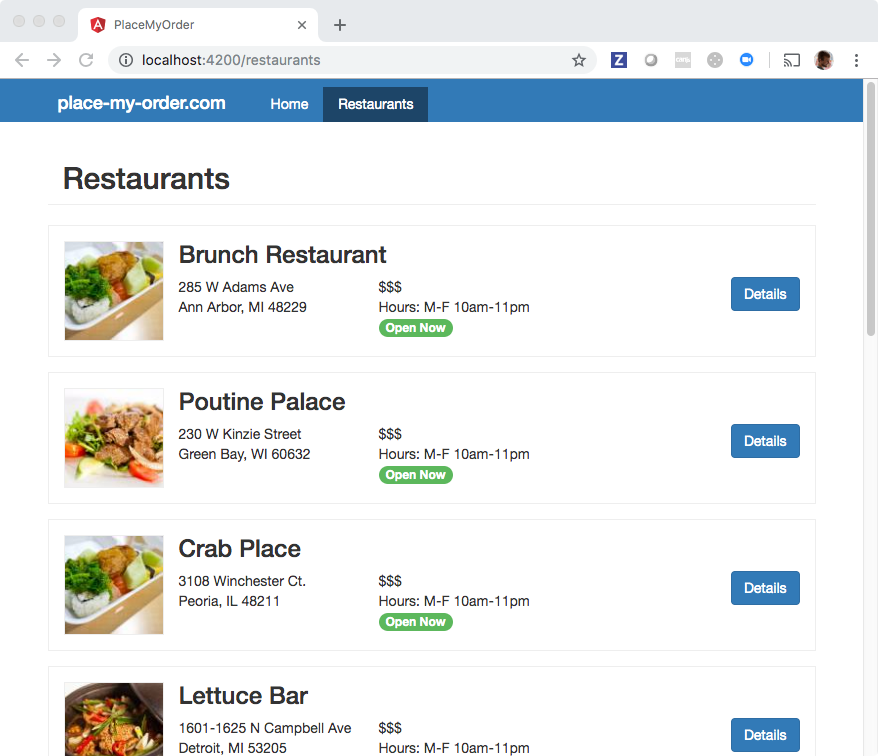
Currently, we are showing a list of all restaurants:
![](https://bitovi.github.io/academy/static/img/angular/8-state-city-options/before.png)

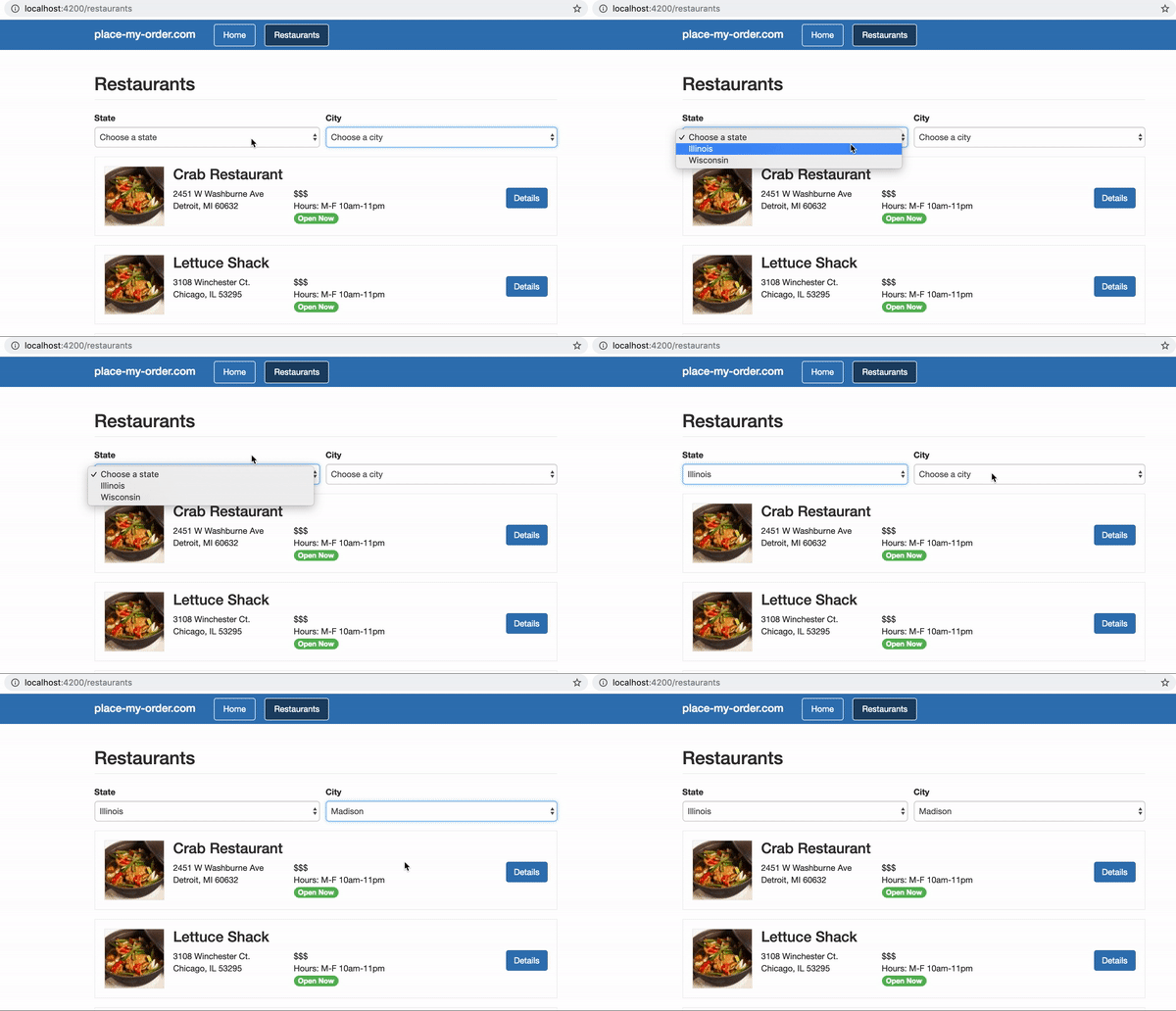
We would like our user to be able to filter restaurants based on city and state. To accomplish this, we will need to implement a reactive form with two controls, `state` and `city`, that are dropdowns displaying a list of cities and states. It will look like the following:
![Place My Order App city and state dropdowns](https://bitovi.github.io/academy/static/img/angular/pmo-dropdowns.gif)

## What you need to know

To solve this, you will need to know:

- How to create a `FormControl`
- How to use `formControl` directive in the DOM
- How to create a `FormGroup`
- How to use `FormBuilder`
- How to use `ngFor` (you learned this in the Creating Components section! ✔️)

## Reactive Forms

We’re eventually going to use select boxes to handle our user’s input. Angular’s [Reactive Forms](https://angular.io/guide/reactive-forms) API provides a clean way to get data from user input and do work based on it.

From the Angular documentation:

> Reactive forms use an explicit and immutable approach to managing the state of a form at a given point in time. Each change to the form state returns a new state, which maintains the integrity of the model between changes. Reactive forms are built around observable streams, where form inputs and values are provided as streams of input values, which can be accessed synchronously.

## ReactiveFormsModule

To use reactive forms we must import our ReactiveFormsModule into the root app.

```
<script src="https://cdnjs.cloudflare.com/ajax/libs/rxjs/6.2.1/rxjs.umd.min.js"></script>
<script src="https://cdnjs.cloudflare.com/ajax/libs/core-js/2.5.7/core.js"/></script>
<script src="https://unpkg.com/@angular/core@7.2.0/bundles/core.umd.js"/></script>
<script src="https://cdnjs.cloudflare.com/ajax/libs/zone.js/0.8.26/zone.min.js"></script>
<script src="https://unpkg.com/@angular/common@7.2.0/bundles/common.umd.js"></script>
<script src="https://unpkg.com/@angular/compiler@7.2.0/bundles/compiler.umd.js"></script>
<script src="https://unpkg.com/@angular/router@7.2.0/bundles/router.umd.js"></script>
<script src="https://unpkg.com/@angular/forms@7.2.0/bundles/forms.umd.js"></script>
<script src="https://unpkg.com/@angular/platform-browser@7.2.0/bundles/platform-browser.umd.js"></script>
<script src="https://unpkg.com/@angular/platform-browser-dynamic@7.2.0/bundles/platform-browser-dynamic.umd.js"></script>
<base href="/">
<my-app></my-app>
<script type="typescript">
const { Component, NgModule, VERSION, OnInit, Injectable } = ng.core;
const { BrowserModule } = ng.platformBrowser;
const { CommonModule } = ng.common;
const { Routes, RouterModule } = ng.router;
const { ReactiveFormsModule } = ng.forms;

@Component({
  selector: 'my-app',
  template: `
    <ul class="nav">
      <li routerLinkActive="active">
        <a routerLink="/about">About</a>
      </li>
    </ul>
    <router-outlet></router-outlet>
  `
})
class AppComponent {
  constructor() {}
}

@Component({
  selector: 'about-component',
  template: `
    <p>An about component!</p>
  `
})
class AboutComponent {
  constructor() {
  }
}

@Component({
  selector: 'home-component',
  template: `
    <p>A home component!</p>
  `
})
class HomeComponent implements OnInit{

  constructor() {
  
  }

  ngOnInit() {
  }
}

const routes: Routes = [
  { path: 'about', component: AboutComponent },
  { path: '**', component: HomeComponent }
]
@NgModule({
  imports: [RouterModule.forRoot(routes)],
  exports: [RouterModule]
})
class AppRoutingModule { }

                 
@NgModule({
  declarations: [AppComponent, AboutComponent, HomeComponent],
  imports: [
    BrowserModule,
    CommonModule,
    AppRoutingModule, 
    ReactiveFormsModule
  ],
  bootstrap: [AppComponent],
  providers: []
})
class AppModule {}

const { platformBrowserDynamic } = ng.platformBrowserDynamic;

platformBrowserDynamic()
  .bootstrapModule(AppModule)
  .catch(err => console.error(err));
</script>

```

## FormControl

The basic element of a reactive form is the [FormControl](https://angular.io/api/forms/FormControl). This class manages the form input model and connection to its input element in the DOM and inherits from the [AbstractControl](https://angular.io/api/forms/AbstractControl) class. It’s worth getting familiar with the methods available in this class (like setValidators and setValue), as they’re used quite often in reactive form development. The formControl is bound to its element in the DOM using the `[formControl]` directive.

```
<script src="https://cdnjs.cloudflare.com/ajax/libs/rxjs/6.2.1/rxjs.umd.min.js"></script>
<script src="https://cdnjs.cloudflare.com/ajax/libs/core-js/2.5.7/core.js"/></script>
<script src="https://unpkg.com/@angular/core@7.2.0/bundles/core.umd.js"/></script>
<script src="https://cdnjs.cloudflare.com/ajax/libs/zone.js/0.8.26/zone.min.js"></script>
<script src="https://unpkg.com/@angular/common@7.2.0/bundles/common.umd.js"></script>
<script src="https://unpkg.com/@angular/compiler@7.2.0/bundles/compiler.umd.js"></script>
<script src="https://unpkg.com/@angular/router@7.2.0/bundles/router.umd.js"></script>
<script src="https://unpkg.com/@angular/platform-browser@7.2.0/bundles/platform-browser.umd.js"></script>
<script src="https://unpkg.com/@angular/platform-browser-dynamic@7.2.0/bundles/platform-browser-dynamic.umd.js"></script>
<script src="https://unpkg.com/@angular/forms@7.2.0/bundles/forms.umd.js"></script>
<base href="/">
<my-app></my-app>
<script type="typescript">
const { Component, NgModule, VERSION, OnInit, Injectable } = ng.core;
const { BrowserModule } = ng.platformBrowser;
const { CommonModule } = ng.common;
const { ReactiveFormsModule, FormControl } = ng.forms;

@Component({
  selector: 'my-app',
  template: `
    <p>A home component!</p>
    <p>
      Value: {{ name.value }}
    </p>
    <label>
      Name:
      <input type="text" [formControl]="name">
    </label>
  `
})
class AppComponent {
  name = new FormControl('');

  constructor() {}
}
           
@NgModule({
  declarations: [AppComponent],
  imports: [
    BrowserModule,
    CommonModule,
    ReactiveFormsModule
  ],
  bootstrap: [AppComponent],
  providers: []
})
class AppModule {}

const { platformBrowserDynamic } = ng.platformBrowserDynamic;

platformBrowserDynamic()
  .bootstrapModule(AppModule)
  .catch(err => console.error(err));
</script>

```

## FormGroup

A [FormGroup](https://angular.io/api/forms/FormGroup) is a way of grouping `FormControl`s and tracking the state of the entire group. For instance, if you want to get the values of all of your `FormControl`s to submit as an object of those values, you’d use `formGroupName.value`. Notice the way we connect our input in the markup is slightly different - we can use the `formControlName` directive to bind to the name value of a `FormControl` in our `FormGroup`. Groups can be nested within other groups or arrays.

```
<script src="https://cdnjs.cloudflare.com/ajax/libs/rxjs/6.2.1/rxjs.umd.min.js"></script>
<script src="https://cdnjs.cloudflare.com/ajax/libs/core-js/2.5.7/core.js"/></script>
<script src="https://unpkg.com/@angular/core@7.2.0/bundles/core.umd.js"/></script>
<script src="https://cdnjs.cloudflare.com/ajax/libs/zone.js/0.8.26/zone.min.js"></script>
<script src="https://unpkg.com/@angular/common@7.2.0/bundles/common.umd.js"></script>
<script src="https://unpkg.com/@angular/compiler@7.2.0/bundles/compiler.umd.js"></script>
<script src="https://unpkg.com/@angular/router@7.2.0/bundles/router.umd.js"></script>
<script src="https://unpkg.com/@angular/platform-browser@7.2.0/bundles/platform-browser.umd.js"></script>
<script src="https://unpkg.com/@angular/platform-browser-dynamic@7.2.0/bundles/platform-browser-dynamic.umd.js"></script>
<script src="https://unpkg.com/@angular/forms@7.2.0/bundles/forms.umd.js"></script>
<base href="/">
<my-app></my-app>
<script type="typescript">
const { Component, NgModule, VERSION, OnInit } = ng.core;
const { BrowserModule } = ng.platformBrowser;
const { CommonModule } = ng.common;
const { ReactiveFormsModule, FormControl, FormGroup } = ng.forms;

@Component({
  selector: 'my-app',
  template: `
    <p>A home component!</p>
    <form [formGroup]="userForm" (ngSubmit)="onSubmit()">
      <label>
          First name:
          <input type="text" formControlName="firstName">
        </label>
        <label>
          Last name:
          <input type="text" formControlName="lastName">
        </label>
        <label>
          Email:
          <input type="text" formControlName="email">
        </label>
        <button type="submit">see form value</button>
    </form>

    {{ formValue | json }}
  `
})
class AppComponent {
  formValue;

  userForm = new FormGroup({
    firstName: new FormControl(''),
    lastName: new FormControl(''),
    email: new FormControl('')
  });

  constructor() {}

  onSubmit() {
    this.formValue = this.userForm.value;
  }
}
                 
@NgModule({
  declarations: [AppComponent],
  imports: [
    BrowserModule,
    CommonModule,
    ReactiveFormsModule
  ],
  bootstrap: [AppComponent],
  providers: []
})
class AppModule {}

const { platformBrowserDynamic } = ng.platformBrowserDynamic;

platformBrowserDynamic()
  .bootstrapModule(AppModule)
  .catch(err => console.error(err));
</script>

```

## FormArray

A [FormArray](https://angular.io/api/forms/FormArray) aggregates `FormControl`s into an array. It’s different than FormGroup in that the controls inside are serialized as an array. `FormArray`s are very useful when dealing with repeated `FormControl`s or dynamic forms that allow users to create additional inputs. Arrays can be nested in groups or other arrays.

This example shows the use of `FormArray` and using an `insert` method to dynamically add more `FormGroup`s to the `users` FormArray.

```
<script src="https://cdnjs.cloudflare.com/ajax/libs/rxjs/6.2.1/rxjs.umd.min.js"></script>
<script src="https://cdnjs.cloudflare.com/ajax/libs/core-js/2.5.7/core.js"/></script>
<script src="https://unpkg.com/@angular/core@7.2.0/bundles/core.umd.js"/></script>
<script src="https://cdnjs.cloudflare.com/ajax/libs/zone.js/0.8.26/zone.min.js"></script>
<script src="https://unpkg.com/@angular/common@7.2.0/bundles/common.umd.js"></script>
<script src="https://unpkg.com/@angular/compiler@7.2.0/bundles/compiler.umd.js"></script>
<script src="https://unpkg.com/@angular/router@7.2.0/bundles/router.umd.js"></script>
<script src="https://unpkg.com/@angular/platform-browser@7.2.0/bundles/platform-browser.umd.js"></script>
<script src="https://unpkg.com/@angular/platform-browser-dynamic@7.2.0/bundles/platform-browser-dynamic.umd.js"></script>
<script src="https://unpkg.com/@angular/forms@7.2.0/bundles/forms.umd.js"></script>
<base href="/">
<my-app></my-app>
<script type="typescript">
const { Component, NgModule, VERSION, OnInit, Injectable } = ng.core;
const { BrowserModule } = ng.platformBrowser;
const { CommonModule } = ng.common;
const { ReactiveFormsModule, FormControl, FormGroup, FormArray } = ng.forms;

@Component({
  selector: 'my-app',
  template: `
    <p>A home component!</p>
    <form [formGroup]="usersForm" (ngSubmit)="onSubmit()">
      <p>This form can handle creating many users at once!</p>
      <ng-container 
      *ngFor="let userFormGroup of usersForm.controls.users.controls; 
      let i = index">
        <div [formGroup]="userFormGroup">
          <label>
            First name:
            <input type="text" formControlName="firstName">
          </label>
          <label>
            Last name:
            <input type="text" formControlName="lastName">
          </label>
          <label>
            Email:
            <input type="text" formControlName="email">
          </label>
        </div>
      </ng-container>
      <button type="submit">see form value</button>
    </form>
    <button (click)="addGroup()">add group</button>

    {{ formValue | json }}
  `
})
class AppComponent {
  formValue;

  usersForm = new FormGroup({
    users: new FormArray([
      new FormGroup({
        firstName: new FormControl(''),
        lastName: new FormControl(''),
        email: new FormControl('')
      }),
      new FormGroup({
        firstName: new FormControl(''),
        lastName: new FormControl(''),
        email: new FormControl('')
      })
    ])
  });

  constructor() {}

  addGroup() {
    const usersArray = this.usersForm.get('users') as FormArray;
    const usersLen = usersArray.length;

    const newUserGroup =  new FormGroup({
      firstName: new FormControl(''),
      lastName: new FormControl(''),
      email: new FormControl('')
    });

    usersArray.insert(usersLen, newUserGroup)
  }

  onSubmit() {
    this.formValue = this.usersForm.value;
  }
}
            
@NgModule({
  declarations: [AppComponent],
  imports: [
    BrowserModule,
    CommonModule,
    ReactiveFormsModule
  ],
  bootstrap: [AppComponent],
  providers: []
})
class AppModule {}

const { platformBrowserDynamic } = ng.platformBrowserDynamic;

platformBrowserDynamic()
  .bootstrapModule(AppModule)
  .catch(err => console.error(err));
</script>

```

## FormBuilder

[FormBuilder](https://angular.io/api/forms/FormBuilder) is a shorthand way to quickly write forms by reducing boilerplate code of manually having to write `new FormControl`, `new FormGroup`, `new FormArray` repeatedly.

```
<script src="https://cdnjs.cloudflare.com/ajax/libs/rxjs/6.2.1/rxjs.umd.min.js"></script>
<script src="https://cdnjs.cloudflare.com/ajax/libs/core-js/2.5.7/core.js"/></script>
<script src="https://unpkg.com/@angular/core@7.2.0/bundles/core.umd.js"/></script>
<script src="https://cdnjs.cloudflare.com/ajax/libs/zone.js/0.8.26/zone.min.js"></script>
<script src="https://unpkg.com/@angular/common@7.2.0/bundles/common.umd.js"></script>
<script src="https://unpkg.com/@angular/compiler@7.2.0/bundles/compiler.umd.js"></script>
<script src="https://unpkg.com/@angular/router@7.2.0/bundles/router.umd.js"></script>
<script src="https://unpkg.com/@angular/platform-browser@7.2.0/bundles/platform-browser.umd.js"></script>
<script src="https://unpkg.com/@angular/platform-browser-dynamic@7.2.0/bundles/platform-browser-dynamic.umd.js"></script>
<script src="https://unpkg.com/@angular/forms@7.2.0/bundles/forms.umd.js"></script>
<base href="/">
<my-app></my-app>
<script type="typescript">
const { Component, NgModule, VERSION, OnInit } = ng.core;
const { BrowserModule } = ng.platformBrowser;
const { CommonModule } = ng.common;
const { ReactiveFormsModule, FormGroup, FormBuilder } = ng.forms;

@Component({
  selector: 'my-app',
  template: `
    <p>A home component!</p>
    <form [formGroup]="userForm">
      <label>
          First name:
          <input type="text" formControlName="firstName">
        </label>
        <label>
          Last name:
          <input type="text" formControlName="lastName">
        </label>
        <label>
          Email:
          <input type="text" formControlName="email">
        </label>
    </form>
  `
})
class AppComponent implements OnInit {
  userForm: FormGroup;

  constructor(private fb:FormBuilder) {}

  ngOnInit() {
    this.userForm = this.fb.group({
      firstName: {value: '', disabled: false},
      lastName: {value: '', disabled: false},
      email: {value: '', disabled: false}
    });
  }
}
//THIS IS A HACK JUST FOR CODEPEN TO WORK
AppComponent.parameters = [FormBuilder];

@NgModule({
  declarations: [AppComponent],
  imports: [
    BrowserModule,
    CommonModule,
    ReactiveFormsModule
  ],
  bootstrap: [AppComponent],
  providers: []
})
class AppModule {}

const { platformBrowserDynamic } = ng.platformBrowserDynamic;

platformBrowserDynamic()
  .bootstrapModule(AppModule)
  .catch(err => console.error(err));
</script>

```

## Form Nullability

Since Angular v14, Angular Forms are strictly typed by default.

By default, all controls include the type `null`. The reason for the `null` type is that when calling `reset` on the form or its controls, the values are updated to `null`.

To avoid the default behavior and having to handle possible `null` values, we can use the `NonNullableFormBuilder`, either via injecting it or accessing the FormBuilder’s `nonNullable` property.

Using `NonNullableFormBuilder` will make `reset` method use the control’s initial value instead of `null`.

```
export class UserComponent {
  constructor(private fb: NonNullableFormBuilder) {
    this.userForm = fb.group({
      email: { value: '', disabled: false },
      firstName: { value: '', disabled: false },
      lastName: { value: '', disabled: false },
    });
  }
}
```

The syntax above is equivalent to the code below:

```
export class UserComponent {
  constructor(private fb: FormBuilder) {
    this.userForm = fb.nonNullable.group({
      email: { value: '', disabled: false },
      firstName: { value: '', disabled: false },
      lastName: { value: '', disabled: false },
    });
  }
}
```

## Technical requirements

Create a reactive form with two formControls, `state` and `city`, and use the `formControlName` directive to bind the formControls to their select elements in the template.

## Setup

Here’s some code to get you started. Notice that:

- The `cities` and `states` are hard coded (for this exercise).
- A `FormBuilder` instance is injected as the `fb` property.
- The `createForm` method is empty. Use it to initialize the form control.

✏️ Update **src/app/restaurant/restaurant.component.ts** to:

```
import { Component, OnInit } from '@angular/core';
import { FormBuilder, FormControl, FormGroup } from '@angular/forms';
import { Restaurant } from './restaurant';
import { ResponseData, RestaurantService } from './restaurant.service';

export interface Data {
  value: Restaurant[];
  isPending: boolean;
}

@Component({
  selector: 'pmo-restaurant',
  templateUrl: './restaurant.component.html',
  styleUrl: './restaurant.component.css',
})
export class RestaurantComponent implements OnInit {
  form: FormGroup<{
    state: FormControl<string>;
    city: FormControl<string>;
  }> = this.createForm();

  restaurants: Data = {
    value: [],
    isPending: false,
  };

  states = {
    isPending: false,
    value: [
      { name: 'Illinois', short: 'IL' },
      { name: 'Wisconsin', short: 'WI' },
    ],
  };

  cities = {
    isPending: false,
    value: [{ name: 'Springfield' }, { name: 'Madison' }],
  };

  constructor(
    private restaurantService: RestaurantService,
    private fb: FormBuilder
  ) {}

  ngOnInit(): void {
    this.restaurants.isPending = true;
    this.restaurantService.getRestaurants().subscribe((res: ResponseData) => {
      this.restaurants.value = res.data;
      this.restaurants.isPending = false;
    });
  }

  createForm(): FormGroup<{
    state: FormControl<string>;
    city: FormControl<string>;
  }> {

  }
}

```

Make sure to use the `formControl` directive to tie the `select` elements to their `FormControl`s in the component.

✏️ Update **src/app/restaurant/restaurant.component.html** to include some boilerplate for the state and city `<select>` controls:

```
<div class="restaurants">
  <h2 class="page-header">Restaurants</h2>
  <form class="form" [formGroup]="form">
    <div class="form-group">
      <label>State</label>
      <select class="formControl">
        <option value="" *ngIf="states.isPending">Loading...</option>
        <ng-container *ngIf="!states.isPending">
          <option value="">Choose a state</option>
          <!-- iterate through all states to create options with
            the short property as the value and the name displayed-->
        </ng-container>
      </select>
    </div>
    <div class="form-group">
      <label>City</label>
      <select class="formControl">
        <option value="" *ngIf="cities.isPending">Loading...</option>
        <ng-container *ngIf="!cities.isPending">
          <option value="">Choose a city</option>
          <!-- iterate through all cities to create options with
            the name property as the value and the name displayed-->
        </ng-container>
      </select>
    </div>
  </form>
  <div class="restaurant loading" *ngIf="restaurants.isPending"></div>
  <ng-container *ngIf="restaurants.value.length">
    <div class="restaurant" *ngFor="let restaurant of restaurants.value">
      <img
        alt=""
        src="{{ restaurant.images.thumbnail | imageUrl }}"
        width="100"
        height="100"
      />
      <h3>{{ restaurant.name }}</h3>

      <div class="address" *ngIf="restaurant.address">
        {{ restaurant.address.street }}<br />{{ restaurant.address.city }},
        {{ restaurant.address.state }} {{ restaurant.address.zip }}
      </div>

      <div class="hours-price">
        $$$<br />
        Hours: M-F 10am-11pm
        <span class="open-now">Open Now</span>
      </div>

      <a class="btn" [routerLink]="['/restaurants', restaurant.slug]">
        Details
      </a>
      <br />
    </div>
  </ng-container>
</div>

```

✏️ Update **src/app/app.module.ts** to import reactiveForms in the root app module:

```
import { HttpClientModule } from '@angular/common/http';
import { NgModule } from '@angular/core';
import { ReactiveFormsModule } from '@angular/forms';
import { BrowserModule } from '@angular/platform-browser';

import { AppRoutingModule } from './app-routing.module';
import { AppComponent } from './app.component';
import { HomeComponent } from './home/home.component';
import { RestaurantComponent } from './restaurant/restaurant.component';
import { ImageUrlPipe } from './image-url.pipe';

@NgModule({
  declarations: [
    AppComponent,
    HomeComponent,
    RestaurantComponent,
    ImageUrlPipe
  ],
  imports: [
    BrowserModule,
    AppRoutingModule,
    HttpClientModule,
    ReactiveFormsModule,
  ],
  providers: [],
  bootstrap: [AppComponent]
})
export class AppModule { }

```

## How to verify your solution is correct

When you visit [localhost:4200/restaurants](http://localhost:4200/restaurants), there will now be state and city dropdown options populated with fake data.

![Place My Order App city and state dropdowns](https://bitovi.github.io/academy/static/img/angular/pmo-dropdowns.gif)

✏️ Update the spec file **src/app/restaurant/restaurant.component.spec.ts** to be:

```
import {
  ComponentFixture,
  fakeAsync,
  TestBed,
  tick,
} from '@angular/core/testing';
import { ReactiveFormsModule } from '@angular/forms';
import { RouterTestingModule } from '@angular/router/testing';
import { of } from 'rxjs';
import { ImageUrlPipe } from '../image-url.pipe';
import { RestaurantComponent } from './restaurant.component';
import { RestaurantService } from './restaurant.service';

class MockRestaurantService {
  getRestaurants() {
    return of({
      data: [
        {
          name: 'Poutine Palace',
          slug: 'poutine-palace',
          images: {
            thumbnail:
              'node_modules/place-my-order-assets/images/4-thumbnail.jpg',
            owner: 'node_modules/place-my-order-assets/images/3-owner.jpg',
            banner: 'node_modules/place-my-order-assets/images/2-banner.jpg',
          },
          menu: {
            lunch: [
              {
                name: 'Crab Pancakes with Sorrel Syrup',
                price: 35.99,
              },
              {
                name: 'Steamed Mussels',
                price: 21.99,
              },
              {
                name: 'Spinach Fennel Watercress Ravioli',
                price: 35.99,
              },
            ],
            dinner: [
              {
                name: 'Gunthorp Chicken',
                price: 21.99,
              },
              {
                name: 'Herring in Lavender Dill Reduction',
                price: 45.99,
              },
              {
                name: 'Chicken with Tomato Carrot Chutney Sauce',
                price: 45.99,
              },
            ],
          },
          address: {
            street: '230 W Kinzie Street',
            city: 'Green Bay',
            state: 'WI',
            zip: '53205',
          },
          _id: '3ZOZyTY1LH26LnVw',
        },
        {
          name: 'Cheese Curd City',
          slug: 'cheese-curd-city',
          images: {
            thumbnail:
              'node_modules/place-my-order-assets/images/2-thumbnail.jpg',
            owner: 'node_modules/place-my-order-assets/images/3-owner.jpg',
            banner: 'node_modules/place-my-order-assets/images/2-banner.jpg',
          },
          menu: {
            lunch: [
              {
                name: 'Ricotta Gnocchi',
                price: 15.99,
              },
              {
                name: 'Gunthorp Chicken',
                price: 21.99,
              },
              {
                name: 'Garlic Fries',
                price: 15.99,
              },
            ],
            dinner: [
              {
                name: 'Herring in Lavender Dill Reduction',
                price: 45.99,
              },
              {
                name: 'Truffle Noodles',
                price: 14.99,
              },
              {
                name: 'Charred Octopus',
                price: 25.99,
              },
            ],
          },
          address: {
            street: '2451 W Washburne Ave',
            city: 'Green Bay',
            state: 'WI',
            zip: '53295',
          },
          _id: 'Ar0qBJHxM3ecOhcr',
        },
      ],
    });
  }
}

describe('RestaurantComponent', () => {
  let fixture: ComponentFixture<RestaurantComponent>;

  beforeEach(async () => {
    await TestBed.configureTestingModule({
      imports: [RouterTestingModule, ReactiveFormsModule],
      declarations: [RestaurantComponent, ImageUrlPipe],
      providers: [
        { provide: RestaurantService, useClass: MockRestaurantService },
      ],
    }).compileComponents();

    fixture = TestBed.createComponent(RestaurantComponent);
  });

  it('should create', () => {
    const component: RestaurantComponent = fixture.componentInstance;
    expect(component).toBeTruthy();
  });

  it('should render title in a h2 tag', () => {
    const compiled = fixture.nativeElement as HTMLElement;
    expect(compiled.querySelector('h2')?.textContent).toContain('Restaurants');
  });

  it('should not show any restaurants markup if no restaurants', () => {
    const compiled = fixture.nativeElement as HTMLElement;
    expect(compiled.querySelector('.restaurant')).toBe(null);
  });

  it('should have two .restaurant divs', fakeAsync((): void => {
    fixture.detectChanges();
    tick(501);
    fixture.detectChanges();
    const compiled = fixture.nativeElement as HTMLElement;
    const restaurantDivs = compiled.getElementsByClassName('restaurant');
    const hoursDivs = compiled.getElementsByClassName('hours-price');
    expect(restaurantDivs.length).toEqual(2);
    expect(hoursDivs.length).toEqual(2);
  }));

  it('should display restaurant information', fakeAsync((): void => {
    fixture.detectChanges();
    tick(501);
    fixture.detectChanges();
    const compiled = fixture.nativeElement as HTMLElement;
    expect(compiled.querySelector('.restaurant h3')?.textContent).toContain(
      'Poutine Palace'
    );
  }));

  it('should set restaurants value to restaurants response data and set isPending to false', fakeAsync((): void => {
    const fixture = TestBed.createComponent(RestaurantComponent);
    fixture.detectChanges();
    tick();
    fixture.detectChanges();
    const expectedRestaurants = {
      value: [
        {
          name: 'Poutine Palace',
          slug: 'poutine-palace',
          images: {
            thumbnail:
              'node_modules/place-my-order-assets/images/4-thumbnail.jpg',
            owner: 'node_modules/place-my-order-assets/images/3-owner.jpg',
            banner: 'node_modules/place-my-order-assets/images/2-banner.jpg',
          },
          menu: {
            lunch: [
              {
                name: 'Crab Pancakes with Sorrel Syrup',
                price: 35.99,
              },
              {
                name: 'Steamed Mussels',
                price: 21.99,
              },
              {
                name: 'Spinach Fennel Watercress Ravioli',
                price: 35.99,
              },
            ],
            dinner: [
              {
                name: 'Gunthorp Chicken',
                price: 21.99,
              },
              {
                name: 'Herring in Lavender Dill Reduction',
                price: 45.99,
              },
              {
                name: 'Chicken with Tomato Carrot Chutney Sauce',
                price: 45.99,
              },
            ],
          },
          address: {
            street: '230 W Kinzie Street',
            city: 'Green Bay',
            state: 'WI',
            zip: '53205',
          },
          _id: '3ZOZyTY1LH26LnVw',
        },
        {
          name: 'Cheese Curd City',
          slug: 'cheese-curd-city',
          images: {
            thumbnail:
              'node_modules/place-my-order-assets/images/2-thumbnail.jpg',
            owner: 'node_modules/place-my-order-assets/images/3-owner.jpg',
            banner: 'node_modules/place-my-order-assets/images/2-banner.jpg',
          },
          menu: {
            lunch: [
              {
                name: 'Ricotta Gnocchi',
                price: 15.99,
              },
              {
                name: 'Gunthorp Chicken',
                price: 21.99,
              },
              {
                name: 'Garlic Fries',
                price: 15.99,
              },
            ],
            dinner: [
              {
                name: 'Herring in Lavender Dill Reduction',
                price: 45.99,
              },
              {
                name: 'Truffle Noodles',
                price: 14.99,
              },
              {
                name: 'Charred Octopus',
                price: 25.99,
              },
            ],
          },
          address: {
            street: '2451 W Washburne Ave',
            city: 'Green Bay',
            state: 'WI',
            zip: '53295',
          },
          _id: 'Ar0qBJHxM3ecOhcr',
        },
      ],
      isPending: false,
    };
    expect(fixture.componentInstance.restaurants).toEqual(expectedRestaurants);
  }));

  it('should show a loading div while isPending is true', () => {
    fixture.detectChanges();
    fixture.componentInstance.restaurants.isPending = true;
    fixture.detectChanges();
    const compiled = fixture.nativeElement as HTMLElement;
    const loadingDiv = compiled.querySelector('.loading');
    expect(loadingDiv).toBeTruthy();
  });

  it('should not show a loading div if isPending is false', () => {
    fixture.detectChanges();
    fixture.componentInstance.restaurants.isPending = false;
    fixture.detectChanges();
    const compiled = fixture.nativeElement as HTMLElement;
    const loadingDiv = compiled.querySelector('.loading');
    expect(loadingDiv).toBe(null);
  });

  it('should have a form property with city and state keys', () => {
    fixture.detectChanges();
    expect(fixture.componentInstance.form.controls['state']).toBeTruthy();
    expect(fixture.componentInstance.form.controls['city']).toBeTruthy();
  });

  it('should show a state dropdown', () => {
    fixture.detectChanges();
    const compiled = fixture.nativeElement as HTMLElement;
    const stateSelect = compiled.querySelector(
      'select[formcontrolname="state"]'
    );
    expect(stateSelect).toBeTruthy();
  });

  it('should show a city dropdown', () => {
    fixture.detectChanges();
    const compiled = fixture.nativeElement as HTMLElement;
    const citySelect = compiled.querySelector('select[formcontrolname="city"]');
    expect(citySelect).toBeTruthy();
  });
});

```

✏️ Update the spec file **src/app/app.component.spec.ts** to be:

```
import { Location } from '@angular/common';
import { HttpClientModule } from '@angular/common/http';
import { NO_ERRORS_SCHEMA } from '@angular/core';
import {
  ComponentFixture,
  fakeAsync,
  flush,
  TestBed,
  tick,
} from '@angular/core/testing';
import { ReactiveFormsModule } from '@angular/forms';
import { Router } from '@angular/router';
import { of } from 'rxjs';
import { AppRoutingModule } from './app-routing.module';
import { AppComponent } from './app.component';
import { HomeComponent } from './home/home.component';
import { ImageUrlPipe } from './image-url.pipe';
import { RestaurantComponent } from './restaurant/restaurant.component';
import { RestaurantService } from './restaurant/restaurant.service';

class MockRestaurantService {
  getRestaurants() {
    return of({
      data: [
        {
          name: 'Poutine Palace',
          slug: 'poutine-palace',
          images: {
            thumbnail:
              'node_modules/place-my-order-assets/images/4-thumbnail.jpg',
            owner: 'node_modules/place-my-order-assets/images/3-owner.jpg',
            banner: 'node_modules/place-my-order-assets/images/2-banner.jpg',
          },
          menu: {
            lunch: [
              {
                name: 'Crab Pancakes with Sorrel Syrup',
                price: 35.99,
              },
              {
                name: 'Steamed Mussels',
                price: 21.99,
              },
              {
                name: 'Spinach Fennel Watercress Ravioli',
                price: 35.99,
              },
            ],
            dinner: [
              {
                name: 'Gunthorp Chicken',
                price: 21.99,
              },
              {
                name: 'Herring in Lavender Dill Reduction',
                price: 45.99,
              },
              {
                name: 'Chicken with Tomato Carrot Chutney Sauce',
                price: 45.99,
              },
            ],
          },
          address: {
            street: '230 W Kinzie Street',
            city: 'Green Bay',
            state: 'WI',
            zip: '53205',
          },
          _id: '3ZOZyTY1LH26LnVw',
        },
        {
          name: 'Cheese Curd City',
          slug: 'cheese-curd-city',
          images: {
            thumbnail:
              'node_modules/place-my-order-assets/images/2-thumbnail.jpg',
            owner: 'node_modules/place-my-order-assets/images/3-owner.jpg',
            banner: 'node_modules/place-my-order-assets/images/2-banner.jpg',
          },
          menu: {
            lunch: [
              {
                name: 'Ricotta Gnocchi',
                price: 15.99,
              },
              {
                name: 'Gunthorp Chicken',
                price: 21.99,
              },
              {
                name: 'Garlic Fries',
                price: 15.99,
              },
            ],
            dinner: [
              {
                name: 'Herring in Lavender Dill Reduction',
                price: 45.99,
              },
              {
                name: 'Truffle Noodles',
                price: 14.99,
              },
              {
                name: 'Charred Octopus',
                price: 25.99,
              },
            ],
          },
          address: {
            street: '2451 W Washburne Ave',
            city: 'Green Bay',
            state: 'WI',
            zip: '53295',
          },
          _id: 'Ar0qBJHxM3ecOhcr',
        },
      ],
    });
  }

  getStates() {
    return of({
      data: [
        { short: 'MO', name: 'Missouri' },
        { short: 'CA  ', name: 'California' },
        { short: 'MI', name: 'Michigan' },
      ],
    });
  }

  getCities(state: string) {
    return of({
      data: [
        { name: 'Sacramento', state: 'CA' },
        { name: 'Oakland', state: 'CA' },
      ],
    });
  }

  getRestaurant(slug: string) {
    return of({
      name: 'Poutine Palace',
      slug: 'poutine-palace',
      images: {
        thumbnail: 'node_modules/place-my-order-assets/images/4-thumbnail.jpg',
        owner: 'node_modules/place-my-order-assets/images/3-owner.jpg',
        banner: 'node_modules/place-my-order-assets/images/2-banner.jpg',
      },
      menu: {
        lunch: [
          {
            name: 'Crab Pancakes with Sorrel Syrup',
            price: 35.99,
          },
          {
            name: 'Steamed Mussels',
            price: 21.99,
          },
          {
            name: 'Spinach Fennel Watercress Ravioli',
            price: 35.99,
          },
        ],
        dinner: [
          {
            name: 'Gunthorp Chicken',
            price: 21.99,
          },
          {
            name: 'Herring in Lavender Dill Reduction',
            price: 45.99,
          },
          {
            name: 'Chicken with Tomato Carrot Chutney Sauce',
            price: 45.99,
          },
        ],
      },
      address: {
        street: '230 W Kinzie Street',
        city: 'Green Bay',
        state: 'WI',
        zip: '53205',
      },
      _id: '3ZOZyTY1LH26LnVw',
    });
  }
}

describe('AppComponent', () => {
  let fixture: ComponentFixture<AppComponent>;
  let location: Location;
  let router: Router;

  beforeEach(async () => {
    await TestBed.configureTestingModule({
      imports: [AppRoutingModule, HttpClientModule, ReactiveFormsModule],
      declarations: [
        AppComponent,
        HomeComponent,
        RestaurantComponent,
        ImageUrlPipe,
      ],
      providers: [
        { provide: RestaurantService, useClass: MockRestaurantService },
      ],
      schemas: [NO_ERRORS_SCHEMA],
    })
      .overrideComponent(RestaurantComponent, {
        set: { template: '<p>I am a fake restaurant component</p>' },
      })
      .compileComponents();

    fixture = TestBed.createComponent(AppComponent);
    location = TestBed.inject(Location);
    router = TestBed.inject(Router);
  });

  it('should create the app', () => {
    const app = fixture.componentInstance;
    expect(app).toBeTruthy();
  });

  it(`should have as title 'place-my-order'`, () => {
    const app = fixture.componentInstance;
    expect(app.title).toEqual('place-my-order');
  });

  it('should render title in a h1 tag', () => {
    fixture.detectChanges();
    const compiled = fixture.nativeElement as HTMLElement;
    expect(compiled.querySelector('h1')?.textContent).toContain(
      'place-my-order.com'
    );
  });

  it('should render the HomeComponent with router navigates to "/" path', fakeAsync(() => {
    fixture.detectChanges();
    const compiled = fixture.nativeElement as HTMLElement;
    router.navigate(['']).then(() => {
      expect(location.path()).toBe('');
      expect(compiled.querySelector('pmo-home')).not.toBe(null);
    });
  }));

  it('should render the RestaurantsComponent with router navigates to "/restaurants" path', fakeAsync(() => {
    fixture.detectChanges();
    const compiled = fixture.nativeElement as HTMLElement;
    router.navigate(['restaurants']).then(() => {
      expect(location.path()).toBe('/restaurants');
      expect(compiled.querySelector('pmo-restaurant')).not.toBe(null);
    });
  }));

  it('should have the home navigation link href set to "/"', () => {
    fixture.detectChanges();
    const compiled = fixture.nativeElement as HTMLElement;
    const homeLink = compiled.querySelector('li a');
    const href = homeLink?.getAttribute('href');
    expect(href).toEqual('/');
  });

  it('should have the restaurants navigation link href set to "/restaurants"', () => {
    fixture.detectChanges();
    const compiled = fixture.nativeElement as HTMLElement;
    const restaurantsLink = compiled.querySelector('li:nth-child(2) a');
    const href = restaurantsLink?.getAttribute('href');
    expect(href).toEqual('/restaurants');
  });

  it('should make the home navigation link class active when the router navigates to "/" path', fakeAsync(() => {
    const compiled = fixture.nativeElement as HTMLElement;
    router.navigate(['']);
    fixture.detectChanges();
    tick();
    fixture.detectChanges();

    const homeLinkLi = compiled.querySelector('li');
    expect(homeLinkLi?.classList).toContain('active');
    expect(compiled.querySelectorAll('.active').length).toBe(1);
    flush();
  }));

  it('should make the restaurants navigation link class active when the router navigates to "/restaurants" path', fakeAsync(() => {
    const compiled = fixture.nativeElement as HTMLElement;
    router.navigate(['restaurants']);
    fixture.detectChanges();
    tick();
    fixture.detectChanges();

    expect(location.path()).toBe('/restaurants');
    const restaurantsLinkLi = compiled.querySelector('li:nth-child(2)');
    expect(restaurantsLinkLi?.classList).toContain('active');
    expect(compiled.querySelectorAll('.active').length).toBe(1);
    flush();
  }));
});

```

## The solution

If you’ve implemented the solution correctly, the tests will pass when you run `npm run test`!

Click to see the solution ✏️ Update **src/app/restaurant/restaurant.component.ts** to:

```
import { Component, OnInit } from '@angular/core';
import { FormBuilder, FormControl, FormGroup } from '@angular/forms';
import { Restaurant } from './restaurant';
import { ResponseData, RestaurantService } from './restaurant.service';

export interface Data {
  value: Restaurant[];
  isPending: boolean;
}

@Component({
  selector: 'pmo-restaurant',
  templateUrl: './restaurant.component.html',
  styleUrl: './restaurant.component.css',
})
export class RestaurantComponent implements OnInit {
  form: FormGroup<{
    state: FormControl<string>;
    city: FormControl<string>;
  }> = this.createForm();

  restaurants: Data = {
    value: [],
    isPending: false,
  };

  states = {
    isPending: false,
    value: [
      { name: 'Illinois', short: 'IL' },
      { name: 'Wisconsin', short: 'WI' },
    ],
  };

  cities = {
    isPending: false,
    value: [{ name: 'Springfield' }, { name: 'Madison' }],
  };

  constructor(
    private restaurantService: RestaurantService,
    private fb: FormBuilder
  ) {}

  ngOnInit(): void {
    this.restaurants.isPending = true;
    this.restaurantService.getRestaurants().subscribe((res: ResponseData) => {
      this.restaurants.value = res.data;
      this.restaurants.isPending = false;
    });
  }

  createForm(): FormGroup<{
    state: FormControl<string>;
    city: FormControl<string>;
  }> {
    return this.fb.nonNullable.group({
      state: { value: '', disabled: false },
      city: { value: '', disabled: false },
    });
  }
}

```

✏️ Update **src/app/restaurant/restaurant.component.html** to:

```
<div class="restaurants">
  <h2 class="page-header">Restaurants</h2>
  <form class="form" [formGroup]="form">
    <div class="form-group">
      <label>State</label>
      <select class="formControl" formControlName="state">
        <option value="" *ngIf="states.isPending">Loading...</option>
        <ng-container *ngIf="!states.isPending">
          <option value="">Choose a state</option>
          <option *ngFor="let state of states.value" [value]="state.short">
            {{ state.name }}
          </option>
        </ng-container>
      </select>
    </div>
    <div class="form-group">
      <label>City</label>
      <select class="formControl" formControlName="city">
        <option value="" *ngIf="cities.isPending">Loading...</option>
        <ng-container *ngIf="!cities.isPending">
          <option value="">Choose a city</option>
          <option *ngFor="let city of cities.value" [value]="city.name">
            {{ city.name }}
          </option>
        </ng-container>
      </select>
    </div>
  </form>
  <div class="restaurant loading" *ngIf="restaurants.isPending"></div>
  <ng-container *ngIf="restaurants.value.length">
    <div class="restaurant" *ngFor="let restaurant of restaurants.value">
      <img
        alt=""
        src="{{ restaurant.images.thumbnail | imageUrl }}"
        width="100"
        height="100"
      />
      <h3>{{ restaurant.name }}</h3>

      <div class="address" *ngIf="restaurant.address">
        {{ restaurant.address.street }}<br />{{ restaurant.address.city }},
        {{ restaurant.address.state }} {{ restaurant.address.zip }}
      </div>

      <div class="hours-price">
        $$$<br />
        Hours: M-F 10am-11pm
        <span class="open-now">Open Now</span>
      </div>

      <a class="btn" [routerLink]="['/restaurants', restaurant.slug]">
        Details
      </a>
      <br />
    </div>
  </ng-container>
</div>

```

###### On this page...

###### Get help

If you need [help](https://discord.gg/J7ejFsZnJ4) with an exercise, please reach out to us on [Discord](https://discord.gg/J7ejFsZnJ4)

If you find a bug, please [create an issue](https://github.com/bitovi/academy/issues/new) or email [contact@bitovi.com](mailto:contact@bitovi.com?Subject=Training%20Suggestion)

## Join the Bitovi Newsletter

 Do you want to receive updates about new Bitovi Academy courses, Bitovi open source projects, and dev community news? If so, please provide your email. We won’t spam you or give it away for any reason!  
*By providing your email you agree to receive communications from Bitovi*

![](https://bitovi.github.io/academy/static/img/close.svg)

```json
{
     "@context": "http://schema.org",
     "@type": "Organization",
     "mainEntityOfPage":{
          "@type":"WebPage",
          "@id":"https://www.bitovi.com/academy/learn-angular/state-city-options.html",
          "description": "Learn how to create a Reactive Form with Angular. We will create a Reactive Form in the Restaurant component with city and state dropdown inputs. 
"
     },
     "url": "http://bitovi.com",
     "logo": "https://www.bitovi.com/hubfs/bitovi-logo-23-1.svg",
     "image": "https://www.bitovi.com/hubfs/bitovi-logo-x2.png",
     "name": "Bitovi Web App Consulting",
     "alternateName": "Bitovi",
      "naics": "541511",
      "description": "Bitovi is a UX, UI design and front-end JavaScript development consulting company",
     "address": {
          "@type": "PostalAddress",
          "streetAddress": "1134 Pine Tree Lane ",
          "addressLocality": "Libertyville",
          "addressRegion": "IL",
          "addressCountry": "United States",
          "postalCode": "60048"
     },
     "areaServed": {
          "@type": "GeoCircle",
          "geoMidpoint": {
               "@type": "GeoCoordinates",
               "latitude": "41.8781",
               "longitude": "87.6298"
          },
          "geoRadius": "5000 km"
     },
     "telephone": "312-620-0386",
     "email": "contact@bitovi.com",
     "sameAs": [
          "https://www.facebook.com/BitoviLLC/",
          "https://twitter.com/bitovi",
          "https://www.linkedin.com/company/bitovi"
     ]
}
```